


Table of Contents
How to Create a Website:
Creating a website may seem complicated at first, but learning how to create a website is easier than you might think. With the right tools and a simple plan, you can build a professional website without any coding experience.
In this beginner-friendly guide, you’ll learn how to create a website from scratch, from choosing a domain name and web hosting to setting up WordPress, designing your pages, adding content, and publishing your site. Whether you want to start a blog, showcase your work, or grow an online business, these simple steps will help you get started with confidence.
1.How to Choose the Right Website Idea
Before you start building your website, it’s important to choose an idea that matches your interests, skills, and goals. A clear website idea will make it easier to create useful content and attract the right audience.
1.Consider Your Interests and Skills
Start by identifying your passions, skills, and how your knowledge can help others. Choosing a topic you enjoy makes it easier to create valuable content and stay motivated over time. However, passion alone isn’t enough—a successful website must also solve a real problem for its audience. The key is finding the sweet spot where your interests, expertise, and your audience’s needs align.
Start by asking yourself:
- What questions do people have about this topic?
- What problems can I help them solve?
- What information is difficult for beginners to understand?
- What can I explain, teach, or recommend better?
- Who would benefit most from my knowledge?
For example, if you enjoy fitness and have experience with home workouts, you could create a website that helps beginners find simple workout routines they can do without expensive equipment.
A simple formula to follow is:
Your Interest + Your Skills + Audience Need = Strong Website Idea
This approach helps you choose a topic you genuinely enjoy while making sure your website provides real value to the people you want to reach.
Four Proven Types of Starter Website Ideas
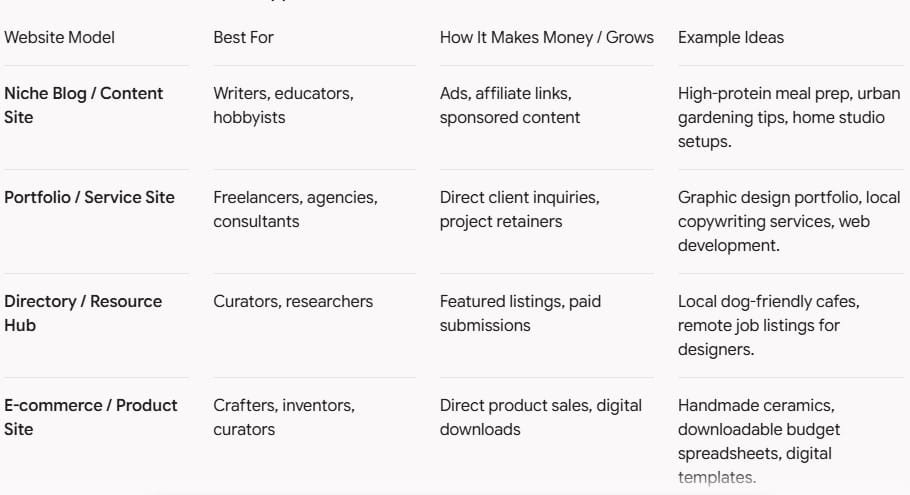
Before spending money or building pages, clarify what your website is designed to do:
2.Identify a Problem You Can Solve
Successful websites don’t just share information. They provide solutions to real problems. Think about the specific challenges, questions, or frustrations your target audience faces. When your content answers their questions clearly or makes a difficult task easier, visitors are more likely to trust your website and come back for more.
Example: Imagine you want to create a website for people who are starting their first blog. Start by listing the problems beginners commonly face, such as choosing a domain name, finding affordable hosting, setting up WordPress, and getting their first visitors.
Then, turn each problem into a content idea:
- Problem: I don’t know how to choose a domain name.
Solution: Create a guide explaining how to choose a memorable domain name. - Problem: I don’t know which hosting provider to use.
Solution: Compare beginner-friendly hosting providers and explain their main differences. - Problem: I don’t know how to set up WordPress.
Solution: Create a step-by-step WordPress setup tutorial. - Problem: I don’t know how to get visitors.
Solution: Publish beginner guides about SEO, keyword research, and content promotion.
After listing several problems and solutions, you can see whether there is enough content to build a complete website around the niche. This helps you choose an idea based on real audience needs, rather than simply choosing a topic you like.
3. Research Your Target Audience
Understand who you want to reach, what they are searching for, and what questions they have. When learning how to create a website, knowing your target audience helps you create useful content and choose the right solutions for them.
Audience research also helps you avoid building a website based only on assumptions. Instead, you can create your website around real needs, relevant topics, and useful solutions, making it easier to attract the right visitors and provide value.
Example: If you want to create a website for beginners who want to build their first website, research questions such as How do I create a website?, Which platform should I use?, and How much does it cost? You can also use Google Trends to explore popular searches and identify topics that interest your potential audience. Use these insights to create practical content that answers their questions and helps them take the next step.
4.Check Your Competition
Look at other websites in your chosen niche to see what type of content they offer and what topics they cover. Analyze their strengths, identify gaps or unanswered questions, and look for opportunities to provide something more useful or easier to understand. This research can help you create a website that offers unique value and gives visitors a reason to choose your content.
Example: If you want to create a website about how to create a website, search Google for similar guides and review the top results. Look at what they cover, how they organize their content, and what questions they do not answer. You could then make your guide more useful by providing clearer steps, beginner-friendly explanations, practical examples, and helpful tool recommendations.
5.Choose an Idea With Growth Potential
Choose a topic that gives you enough opportunities to create useful content and grow your website over time. A strong idea should allow you to cover different subtopics, answer new questions, and expand your website as your audience grows.
Example: If you choose fitness for beginners as your niche, you could create content about workout routines, nutrition basics, home exercises, fitness equipment, and healthy habits. This gives you plenty of topics to cover and allows your website to grow with your audience.
2.How to Choose a Domain Name
Choosing the right domain name is an important step when creating a website. A domain name is the unique web address people use to find your website online. Your domain should be simple, memorable, relevant, and easy to type. A good domain name can make your website look more professional and help visitors remember your brand.
Here are some practical tips to choose the right domain name:
1. Keep It Short and Simple
Choose a domain name that is short, easy to remember, spell, and type. Avoid long words, complicated spellings, hyphens, or unnecessary numbers that could make your domain difficult to remember or share.
Example:
Instead of thebestonlinemarketingtipswebsite.com, choose something shorter like marketingguide.com.
2. Make It Relevant to Your Website
Choose a domain name that gives visitors a clear idea of what your website is about. You can include a relevant keyword, your brand name, or a combination of both. A relevant domain can make your website easier to recognize and help build a strong, memorable brand.
example, if you create a website about SEO tools, a domain like https://rankwise9.com can work well because it creates a unique brand while fitting the website’s focus. A relevant domain can make your website easier to recognize and help build a strong, memorable brand.
3. Choose the Right Domain Extension
A .com domain is generally a strong choice because it is familiar, professional, and easy to remember. However, extensions such as .org, .net, or country-specific extensions can also work depending on your website and target audience. For example, a business targeting visitors in the USA could consider a .us domain.
4. Avoid Hyphens and Unnecessary Numbers
Avoid hyphens and unnecessary numbers when choosing your domain name. They can make your website address harder to remember, spell, and share. For example, bestseotools.com is easier to remember and type than best-seo-tools-2026.com. When possible, choose a clean and simple domain name.
5. Check That the Name Is Available
Before choosing your final domain name, check that it is available for registration and make sure a similar name is not already being used by another business or brand. This can help you avoid confusion and potential trademark issues.
Tip: Create a shortlist of 3–5 domain names, check their availability, and compare them before making your final choice.
check the name is available for this lien :https://www.namecheap.com/
6. Think About the Future
Choose a domain name that gives your website room to grow. Avoid names that are too specific if you plan to cover new topics, products, or services later.
Example: If you want to cover different areas of online marketing, avoid choosing a domain that focuses only on one SEO tool.
3.How to Choose the Best Website Hosting
1.How to Choose the Best Website Hosting
Once you have chosen your domain name, the next step is to choose a reliable web hosting service. Web hosting is the service that stores your website’s files and makes your site available to visitors online.
The right hosting provider can make a big difference in your website’s speed, security, reliability, and future growth. If you are creating your first website, look for a hosting service that is easy to use and provides the essential features you need without unnecessary complexity.
2.Consider Your Website’s Needs
Before choosing a hosting plan, think about what you want to build. A small personal blog may not need the same resources as an online store or a growing business website.
Consider the type of website you plan to create, the amount of content you expect to publish, and how much traffic you may receive. This will help you choose a plan that fits your needs without paying for features you do not need.
3.Look for Good Performance
Website speed is important for both visitors and SEO. Choose a hosting provider that offers reliable performance and fast loading times.
A slow website can create a poor user experience and may cause visitors to leave before exploring your content. Look for hosting with modern servers, caching options, and performance features.
4.Check Security Features
Website security should be a priority from the beginning. Look for hosting that includes an SSL certificate, regular backups, malware protection, and other basic security features.
An SSL certificate helps protect information exchanged between your website and its visitors and enables your site to use HTTPS.
5.Choose Easy WordPress Setup
If you plan to create your website with WordPress, choose a hosting provider that makes WordPress installation and management simple.
Features such as one-click WordPress installation, automatic updates, and an easy-to-use control panel can make website management much easier for beginners.
6.Consider Customer Support
Even with beginner-friendly hosting, you may eventually have questions or encounter technical problems. Good customer support can help you solve issues more quickly.
Check whether the hosting provider offers support through live chat, email, or other convenient channels, and look for providers with helpful documentation and tutorials.
7.Think About Future Growth
Your website may start small, but it can grow over time. Choose a hosting plan that allows you to upgrade your resources when you need more storage, traffic capacity, or performance.
You do not need the most expensive plan when starting out. Instead, choose a reliable plan that meets your current needs and gives you room to grow.
Popular Web Hosting Providers
- Hostinger— Affordable and beginner-friendly, with WordPress hosting, automatic updates, migration tool
- Bluehost— A beginner-friendly WordPress host with easy setup, free SSL, a free domain on eligible plans, and 24/7 support.
- SiteGround— Focuses on WordPress performance, security, backups, and managed features with 24/7 support.
- DreamHost— Offers WordPress hosting with daily backups, free mig
Tip: Compare the providers based on your budget, website needs, performance, support, security, and renewal prices before choosing a plan. Private Hosting
4.How to Build Your Website Step by Step
There are several platforms you can use to create a website, depending on your experience, goals, and the type of website you want to build. You don’t need coding skills to get started with most modern website builders.
1. WordPress
WordPress is one of the most popular platforms for creating websites and blogs. It offers thousands of themes and plugins, giving you the flexibility to customize your website and grow it over time.
Best for: Blogs, business websites, content websites, and websites you plan to grow over time.
Want to learn more?
👉 Visit our post to learn more: How to Create a Website with WordPress
2. Wix
Wix is a beginner-friendly website builder that lets you create a website using a drag-and-drop editor. You can choose from ready-made templates and customize your site without coding.
Best for: Beginners, portfolios, small businesses, and simple websites.
3. Squarespace
Squarespace is known for its professional templates and simple editing experience. It can be a good option if design and visual presentation are important for your website.
Best for: Portfolios, creative businesses, blogs, and service-based websites.
4. Shopify
Shopify is designed specifically for creating and managing online stores. It provides tools for products, payments, orders, inventory, and ecommerce management.
Best for: Online stores and ecommerce businesses.
5. Webflow
Webflow gives users more control over website design and layout while offering a visual website-building experience.
Best for: Designers, agencies, and users who want greater control over their website’s design.
6. Hostinger Website Builder
Hostinger Website Builder provides an easy way to create a website with templates and a visual editor. It can be a convenient option for beginners who want hosting and website creation in one place.
Best for: Beginners, small businesses, portfolios, and simple websites.
Which Website Platform Should You Choose?
The best platform depends on your goals. WordPress is a strong choice if you want flexibility, content creation, and long-term growth. Wix and Squarespace are suitable for beginners who want a simple website-building experience, while Shopify is a better option for ecommerce.
Choose the platform that matches your needs, budget, technical experience, and plans for your website.
Hire a Web Design Agency
If you don’t have the time, technical skills, or experience to build a website yourself, hiring a professional can be a great option. Web designers, developers, and agencies can create a website for you based on your goals, brand, and audience.
You can find professionals through platforms such as Fiverr, Upwork, Toptal, DesignRush, and Clutch. Before choosing a service, compare their experience, portfolio, reviews, services, and pricing to find the right fit for your project.
- Fiverr— A popular freelance marketplace where you can hire professionals to
- Upwork— A platform where you can find both freelance web designers and developers for small projects and complete
- Toptal— A professional
- DesignRush— A directory that helps you discover and compare professional web design and developers
- Clutch— A business services directory where you can
Tip: Before hiring a professionportfolio, reviews, serto make sure they are a good fit for your website project.
5.How to Choose a Website Design
Choosing the right website design is important because it affects how visitors experience your site. A good design should look professional, be easy to navigate, and make your content easy to read.
Before choosing a design, think about your website’s purpose, target audience, and brand style. Choose a clean and responsive design that works well on both desktop and mobile devices.
1.Keep Your Design Simple
Avoid adding too many colors, fonts, animations, or unnecessary elements. A simple layout helps visitors find the information they need quickly.
2.Choose a Mobile-Friendly Design
Many visitors access websites from smartphones and tablets. Make sure your design looks good and works properly on different screen sizes.
3.Match Your Brand
Your colors, fonts, images, and overall style should match your brand. Consistent design helps make your website look more professional and memorable.
4.Make Navigation Easy
Use a clear menu and organize your pages logically. Visitors should be able to find important pages such as Home, About, Services, Blog, and Contact without difficulty.
5.Focus on Speed and Performance
A visually attractive website is not enough if it loads slowly. Choose a lightweight design and optimize images and other elements to provide a better user experience.
6.How to Create Essential Website Pages
Once you have chosen your website design, the next step is to create the essential pages your visitors need. These pages help people understand your website, find important information, and contact you easily.
The exact pages you need depend on your website type, but most websites should include the following:
1. Home Page
Your Home page is usually the first page visitors see. Explain what your website offers and guide visitors to your most important content, products, or services.
2. About Page
The About page introduces you, your business, or your website. Explain who you are, what you do, and why visitors should trust your website.
3. Services or Products Page
If you offer services or sell products, create a dedicated page that clearly explains what you offer. Include useful details and make it easy for visitors to take the next step.
4. Blog Page
A Blog allows you to publish helpful articles and information for your audience. Regularly creating useful content can also help your website attract visitors through search engines.
5. Contact Page
Make it easy for visitors to contact you. You can include a contact form, email address, phone number, or other relevant contact information.
6. Privacy Policy
A Privacy Policy explains how your website collects, uses, and protects visitors’ personal information. This page is especially important if your website uses contact forms, analytics, cookies, or other tracking tools.
7. Terms and Conditions
Terms and Conditions explain the rules for using your website and can help clarify your responsibilities and those of your visitors.
Tip: Keep your website pages clear, organized, and easy to navigate. Start with the essential pages and add more as your website grows.
7.How to Make Your Website Mobile-Friendly
Today, many people browse websites using smartphones and tablets. Making your website mobile-friendly ensures that visitors can easily read your content, navigate your pages, and interact with your site on any screen size.
A mobile-friendly website should be responsive, easy to use, and fast to load. Follow these simple steps to improve the mobile experience:
1. Use a Responsive Design
Choose a responsive theme or design that automatically adapts your website to different screen sizes. Your content should look good on desktops, tablets, and smartphones.
2. Make Text Easy to Read
Use clear fonts and an appropriate font size. Avoid very small text that forces mobile visitors to zoom in to read your content.
3. Optimize Images
Large images can slow down your website, especially on mobile devices. Compress your images and use suitable file formats to improve loading speed.
4. Keep Navigation Simple
Use a clear and easy-to-use mobile menu. Visitors should be able to find important pages without having to search through complicated menus.
5. Make Buttons Easy to Tap
Buttons and links should be large enough and spaced properly so visitors can tap them easily without accidentally clicking another element.
6. Test Your Website on Mobile Devices
Before publishing your website, check how it looks and works on different smartphones and tablets. Test your menus, buttons, forms, images, and pages to make sure everything works correctly.
Tip: A mobile-friendly website provides a better user experience and can also help your website perform better in search results.
8.How to Add SEO to Your Website
SEO helps people find your website on Google. Start by choosing words that people search for and use them in your titles and content. Write helpful and easy-to-read information. Add simple descriptions to your pages and images. Make sure your website works well on phones and loads quickly. You can also use Google Search Console to check how your website is doing on Google.
Follow these simple steps to add SEO to your website:
Step 1: Find keywords
Choose words that people search for on Google.
Step 2: Add keywords
Use your keywords in your page title, headings, and content.
Step 3: Write useful content
Create simple content that answers your visitors’ questions.
Step 4: Optimize images
Add a short description (alt text) to your images.
Step 5: Make your website faster
Make sure your pages load quickly and work well on mobile phones.
Step 6: Check your results
Use Google Search Console to check your website’s SEO performance.
👉 Visit Our Post to Learn More: What Is SEO? A Simple Guide to Better Search Rankings
9.How to Make Your Website Fast and Secure
A fast and secure website provides a better experience for visitors and helps build trust. Slow loading times can make visitors leave, while poor security can put your website and its users at risk.
Here are some simple steps to improve your website’s speed and security:
Step 1: Choose reliable hosting
Use a trusted hosting provider with strong performance, security features, and regular backups.
Step 2: Enable HTTPS
Install an SSL certificate so your website uses HTTPS and protects information sent between your site and visitors.
Step 3: Optimize images
Compress images and use modern file formats to reduce loading times without sacrificing quality.
Step 4: Use caching
Enable browser and server caching so returning visitors can load your pages more quickly.
Step 5: Keep software updated
Regularly update your content management system, themes, plugins, and other website software to fix security vulnerabilities.
Step 6: Protect your website
Use strong passwords, two-factor authentication, a firewall, and malware scanning to help prevent unauthorized access.
Step 7: Monitor performance and security
Test your website speed, check for broken links, review security alerts, and keep regular backups.
Tip: Don’t focus only on how your website looks. A fast, secure, and reliable website gives visitors a better experience and helps you build trust over time.
10.How to Publish Your Website
Once your website is designed, your essential pages are ready, and everything has been tested, you’re ready to publish it. Publishing makes your website accessible to visitors online.
Follow these simple steps to publish your website and keep it fast and secure:
Step 1: Choose reliable hosting
Select a trusted hosting provider with strong performance, security features, and regular backups.
Step 2: Register a domain name
Choose a clear, memorable domain name and register it through a reputable domain registrar.
Step 3: Connect your domain to your hosting
Update your domain’s DNS settings or nameservers so the domain points to your hosting account.
Step 4: Upload your website files
Use your hosting provider’s file manager, an FTP client, or a deployment tool to upload your website files to the correct directory.
Step 5: Configure your website
Set up your content management system, database, environment settings, and any required plugins or integrations.
Step 6: Enable HTTPS
Install an SSL certificate so your website uses HTTPS and protects information sent between your site and visitors.
Step 7: Test your website
Check that pages, links, forms, images, and interactive features work correctly on desktop and mobile devices.
Step 8: Optimize images
Compress images and use modern file formats to reduce loading times without sacrificing quality.
Step 9: Use caching
Enable browser and server caching so visitors can load your pages more quickly.
Step 10: Keep software updated
Regularly update your content management system, themes, plugins, and other website software to fix security vulnerabilities.
Step 11: Protect your website
Use strong passwords, two-factor authentication, a firewall, and malware scanning to help prevent unauthorized access.
Step 12: Monitor performance and security
Test your website speed, check for broken links, review security alerts, and keep regular backups.
11.How to Get Your First Visitors
Follow these practical strategies to attract your first visitors, establish an initial audience, and create a strong foundation for sustainable website growth.
Step 1: Share your website with people you know
Tell friends, family, colleagues, and professional contacts about your website. Ask them to visit, share it with relevant people, and provide honest feedback.
Step 2: Create useful content
Publish helpful articles, guides, tutorials, or resources that answer questions your target audience is already asking.
Step 3: Optimize your pages for search engines
Use clear page titles, descriptive headings, relevant keywords, helpful meta descriptions, and easy-to-read URLs so search engines can understand your content.
Step 4: Share on social media
Post links to your website on the platforms where your audience spends time. Use engaging descriptions, images, and short videos to encourage clicks.
Step 5: Participate in relevant communities
Join forums, online groups, and discussion communities related to your topic. Answer questions thoughtfully and share your website only when it genuinely adds value.
Step 6: Build an email list
Offer a useful resource, discount, or newsletter signup to encourage visitors to subscribe. Send helpful updates and links to new content.
Step 7: Connect with other website owners
Reach out to bloggers, creators, and businesses in your field. Look for opportunities to contribute guest posts, collaborate, or exchange relevant recommendations.
Step 8: Submit your website to directories
List your website in reputable industry directories, local business listings, and niche platforms that your potential visitors may use.
Step 9: Use online communities and Q&A sites
Answer relevant questions on platforms such as Reddit, Quora, or specialized forums. Focus on being helpful rather than posting promotional links.
Step 10: Consider a small advertising campaign
Use a limited budget to test search or social media ads aimed at a specific audience. Track results and improve your campaigns based on what works.
Step 11: Make your website easy to share
Add clear calls to action, social sharing options, and useful page previews so visitors can easily recommend your content.
Step 12: Track your results and improve
Use analytics to see where visitors come from, which pages they view, and where they leave. Continue creating and promoting the content that attracts the most interest.
12.How to Maintain and Update Your Website
Step 1: Review your content regularly
Check your pages, articles, guides, and resources for outdated information, broken links, incorrect details, and content that no longer reflects your goals.
Step 2: Add fresh content
Publish new articles, updates, tutorials, case studies, or resources that answer your audience’s current questions and provide ongoing value.
Step 3: Update page titles and descriptions
Review your page titles, headings, meta descriptions, and URLs to ensure they accurately describe your content and remain helpful for search engines and visitors.
Step 4: Check links and media
Test internal and external links, images, videos, downloads, and embedded content. Replace or remove anything that no longer works.
Step 5: Keep your design current
Review your layout, navigation, branding, images, and calls to action. Make sure the website still looks professional and is easy to use.
Step 6: Test your website on different devices
Check your pages on phones, tablets, and desktop computers. Confirm that text is readable, buttons work, and content displays correctly at different screen sizes.
Step 7: Improve accessibility
Use descriptive image alt text, clear headings, sufficient color contrast, readable fonts, keyboard-friendly navigation, and captions or transcripts where appropriate.
Step 8: Protect your website
Keep your website platform, themes, plugins, extensions, and other software updated. Use strong passwords, enable two-factor authentication, and remove unused accounts or tools.
Step 9: Back up your website
Create regular backups of your website files and database. Store backups securely and occasionally test that you can restore your website successfully.
Step 10: Monitor performance and security
Watch for slow-loading pages, downtime, suspicious activity, malware warnings, and unusual changes. Address problems as soon as possible.
Step 11: Review analytics and feedback
Use analytics to see which pages visitors view, how they find your website, and where they leave. Consider visitor feedback when deciding what to improve.
Step 12: Check forms and contact details
Test contact forms, signup forms, booking tools, payment features, email addresses, phone numbers, and business hours to ensure visitors can reach you.
Step 13: Review privacy and legal information
Keep your privacy policy, terms, cookie notices, accessibility information, and other required disclosures accurate and appropriate for your website and audience.
Step 14: Create a maintenance schedule
Set a regular schedule for content reviews, software updates, backups, security checks, performance testing, and analytics reviews so important tasks are not overlooked.
13.How to Make Money From Your Website
A website can become a valuable source of income when it attracts the right audience and offers useful products, services, or information. The best monetization method depends on your niche, traffic, audience, and business goals. Here are practical ways to make money from your website:
Step 1: Display advertising
Join an advertising network and place ads on your website. You may earn money when visitors view or click the ads. This method works best for websites with consistent traffic, especially blogs, news sites, and informational platforms.
Step 2: Use affiliate marketing
Promote products or services from other companies using special affiliate links. When someone makes a purchase through your link, you earn a commission. Choose products that are relevant to your audience and provide honest recommendations.
Step 3: Sell your own products
Create an online store and sell physical products, digital downloads, templates, artwork, software, or other items. Selling your own products can provide higher profits because you control the pricing and customer experience.
Step 4: Offer online services
Use your website to promote services such as writing, graphic design, web development, consulting, coaching, photography, marketing, or virtual assistance. Include clear service descriptions, prices, examples of your work, and an easy way for visitors to contact you.
Step 5: Create and sell online courses
If you have knowledge or experience in a specific subject, create a course with videos, lessons, worksheets, quizzes, or downloadable resources. A well-organized course can generate income while helping your audience achieve a specific goal.
Step 6: Offer memberships or subscriptions
Create a members-only section with premium articles, tutorials, tools, videos, community access, or other exclusive content. Charge visitors a recurring monthly or yearly fee for access.
Step 7: Sell digital products
Digital products such as ebooks, guides, checklists, printables, presets, templates, and online resources can be sold repeatedly without inventory or shipping costs.
Step 8: Accept sponsored content
Companies may pay you to publish sponsored articles, product reviews, videos, or other promotional content. Only work with brands that are relevant to your audience, and clearly disclose sponsored relationships.
Step 9: Generate leads for businesses
If your website attracts people interested in a particular service, you can collect inquiries and connect them with businesses. Companies may pay you for qualified leads or successful referrals.
Step 10: Create a job board or directory
A niche job board, business directory, or classified website can earn money by charging users to post listings, promote their profiles, or access premium features.
Step 11: Accept donations or support
If your website provides valuable free content, you can ask visitors to support your work through donations, memberships, or platforms that allow recurring contributions.
Step 12: Build an email list
Offer a useful free resource, such as an ebook, checklist, or discount, in exchange for visitors’ email addresses. Use your email list to promote products, services, affiliate offers, and new content.
Step 13: Improve your website traffic
More targeted visitors can create more earning opportunities. Publish helpful content, optimize your pages for search engines, promote your website on social media, and build relationships with other websites in your niche.
Step 14: Build trust with your audience
Be honest about your recommendations, protect visitors’ personal information, provide clear contact details, and publish high-quality content. Trust encourages visitors to buy products, click affiliate links, subscribe, and return to your website.
Step 15: Track your results and improve
Use analytics to monitor traffic, sales, clicks, signups, and conversions. Test different headlines, offers, page layouts, and calls to action to discover what works best.
The most successful websites usually combine several income methods instead of relying on only one. Start with one strategy that matches your audience, focus on providing real value, and gradually add other monetization methods as your website grows.
Conclusion
How to Create a Website doesn’t have to be complicated. With the right platform, domain name, hosting, and a clear plan, you can build a professional website even if you have no technical experience.
In this guide, you’ve learned the essential steps, from choosing your domain and setting up hosting to designing your pages, publishing your website, and attracting visitors. The key is to start simple, focus on your audience, and improve your website over time.

[…] After choosing a web hosting provider, you can start building your website. If you’re new to website creation, check out our guide on How to Create a Website with WordPress. […]