

ChatGPT is an AI-powered tool developed by OpenAI that can understand questions and instructions and generate helpful responses in natural language. It can assist with tasks such as writing, brainstorming, learning, research, coding, planning, and content creation.
ChatGPT has become useful for beginners, creators, students, marketers, and website owners because it can help save time, generate ideas, explain complex topics, and organize tasks. Whether you are learning something new, creating content, or building a website, ChatGPT can provide practical assistance throughout the process.
Table of Contents
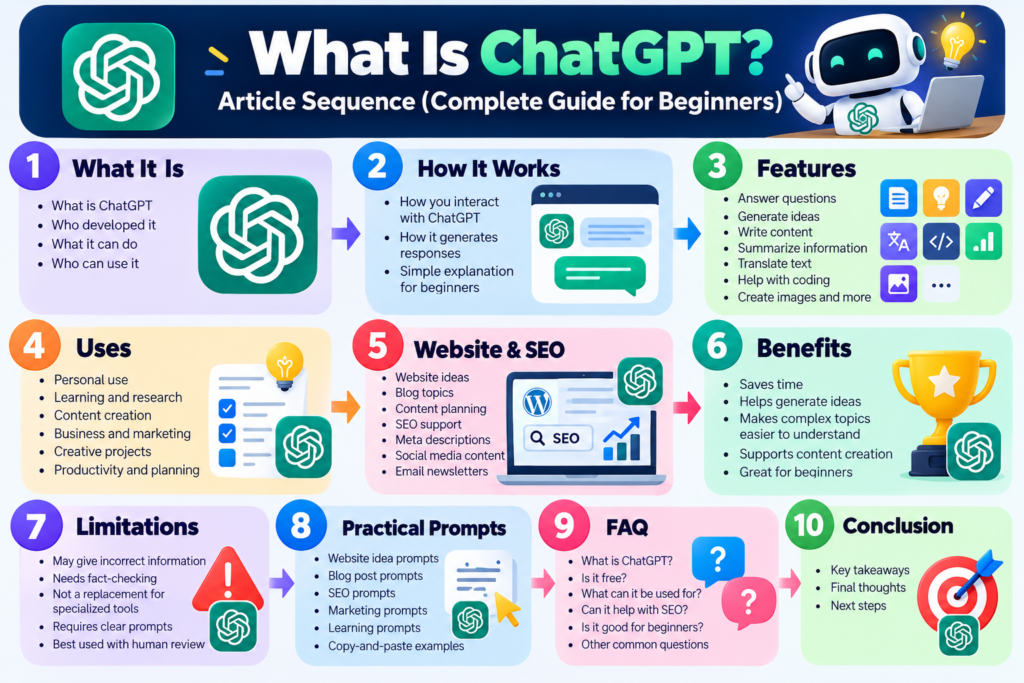
1. What Is ChatGPT?
ChatGPT is an AI-powered conversational tool developed by OpenAI. It is designed to understand natural-language questions and instructions and generate helpful responses. Whether you are a beginner, creator, student, marketer, or website owner, ChatGPT can assist with a wide range of tasks, from learning and brainstorming to writing, planning, and problem-solving.
What Is ChatGPT?
ChatGPT allows users to communicate with AI through a simple conversation. You can type a question, describe a task, or give it an instruction, and ChatGPT will generate a response based on your request. You can also ask follow-up questions to improve or expand the response.
Who Developed ChatGPT?
ChatGPT was developed by OpenAI, an artificial intelligence company that develops AI models and tools. OpenAI created ChatGPT to make interacting with AI more accessible through natural-language conversations.
What Can ChatGPT Help You Do?
ChatGPT can help with many different tasks, including:
- Generate ideas and brainstorm topics
- Write, rewrite, and improve content
- Explain complex concepts in simple language
- Summarize information
- Translate text
- Help with coding
- Create content plans
- Support SEO and marketing tasks
- Analyze information and files
- Assist with learning and research
How Do People Interact With ChatGPT?
People interact with ChatGPT by entering a prompt, which is simply a question or instruction. For example, you could ask:
“Give me 10 website ideas for beginners interested in online marketing and explain the target audience for each.”
ChatGPT will generate a response based on your prompt. You can then ask follow-up questions, request changes, or provide more details to make the response more useful.
For beginners, this conversational approach makes ChatGPT easy to use because you do not need advanced technical skills to get started.
2. How Does ChatGPT Work?
ChatGPT works by processing the text you provide and generating a response based on patterns it learned during training. You can communicate with it using everyday language, without needing to know how artificial intelligence works.
How You Interact With ChatGPT
You start by entering a question, request, or instruction in the chat. ChatGPT analyzes your prompt and generates a response. You can then continue the conversation and ask additional questions to improve or change the result.
How ChatGPT Generates Responses
ChatGPT uses an AI model trained to understand and generate language. When you provide a prompt, the model processes the context and predicts a suitable response. The quality of the result can depend on the information and instructions you provide.
Why Your Prompt Matters
A clear and specific prompt can help you get a more useful response. Instead of asking:
“Give me website ideas.”
You could ask:
“Give me 10 website ideas for beginners interested in SEO and online marketing. Include the target audience, the problem each website could solve, and possible monetization methods.”
This gives ChatGPT more context and makes the requested result clearer.
Can You Continue the Conversation?
Yes. One of the useful aspects of ChatGPT is that you can ask follow-up questions within a conversation. You can request a shorter answer, ask for more examples, change the writing style, or provide additional information.
For example, after receiving website ideas, you could ask:
“Which of these ideas would be suitable for a beginner? Explain why and suggest five blog topics for it.”
This makes ChatGPT useful as a conversational assistant rather than simply a tool that provides one response.
3. What Can ChatGPT Do?
ChatGPT can help with many different tasks, from generating ideas and writing content to explaining information, analyzing files, assisting with coding, and planning projects. Its wide range of capabilities makes it useful for beginners, students, creators, marketers, and website owners.
Here are some of the most common things you can do with ChatGPT:
- Generate Ideas: Brainstorm website ideas, blog topics, business concepts, and creative projects.
- Write and Rewrite Content: Create drafts, improve paragraphs, rewrite text, and adjust the tone of your content.
- Learn New Topics: Ask questions and receive explanations that can be adapted to your level of knowledge.
- Summarize Information: Turn long text into shorter summaries and key points.
- Translate Text: Translate content between different languages and improve translated text.
- Help With Coding: Generate code, explain programming concepts, and help identify coding errors.
- Create Content Plans: Organize blog posts, social media content, newsletters, and marketing campaigns.
- Support SEO: Brainstorm keywords, create content outlines, suggest titles, and generate meta description ideas.
- Analyze Information: Work with supported files and information to identify patterns, summarize data, or answer questions.
- Research and Planning: Help organize research, compare ideas, create plans, and explore different approaches.
If you are building a website, ChatGPT can also help you plan content, generate ideas, and develop strategies for growing your site. For more ideas, see our guide on AI Tools to Build and Grow a Website.
These capabilities make ChatGPT a flexible tool that can support you at different stages of a project, from the initial idea to creating and improving the final result.
4. Key Features of ChatGPT
ChatGPT offers a variety of features that can help users with everyday tasks, learning, content creation, research, and professional work. These features make it a flexible tool for beginners as well as more experienced users.
1. Answer Questions
ChatGPT can answer questions and explain concepts in simple language. You can ask about general topics, technical subjects, or specific problems and request examples when needed.
2. Generate Ideas
You can use ChatGPT to brainstorm ideas for websites, businesses, blog posts, social media content, marketing campaigns, and creative projects.
3. Write and Rewrite Content
ChatGPT can help create drafts, rewrite existing text, improve readability, change the tone, and organize content into a clearer structure.
4. Summarize Information
You can provide text and ask ChatGPT to summarize it, extract key points, or explain the main ideas in a simpler way.
5. Translate Text
ChatGPT can help translate text between languages and can also adjust the wording to make a translation sound more natural.
6. Help With Coding
ChatGPT can explain programming concepts, generate code examples, review code, and help identify potential errors in HTML, CSS, JavaScript, Python, and other programming languages.
7. Create Content Plans
For bloggers and website owners, ChatGPT can help create content calendars, article outlines, social media plans, newsletters, and marketing ideas.
8. Support SEO
ChatGPT can help with SEO tasks such as brainstorming keywords, creating article structures, suggesting titles, writing meta descriptions, and generating FAQ ideas. However, dedicated SEO tools are better suited for accurate search volume, keyword difficulty, and competitor data.
9. Analyze Files and Information
When supported, ChatGPT can work with uploaded files and information to summarize content, answer questions, organize data, and identify useful insights.
10. Image and Visual Capabilities
ChatGPT can also work with images and, depending on the available features, help users understand visual information or create images from written descriptions.
11. Voice Conversations
Voice features can allow users to communicate with ChatGPT by speaking instead of typing, making conversations more natural and convenient.
12. Web Search and Research
When web search is available, ChatGPT can search for current information and help users research topics using online sources. For important information, it is still a good practice to check the original sources.
5. How to Use ChatGPT
Using ChatGPT is simple, even if you have never used an AI tool before. You can start with a basic question and gradually learn how to write more detailed prompts to get better results.
1. Start a Conversation
Open ChatGPT and start a new conversation. You can begin by typing a question, idea, or task into the message box.
2. Write a Clear Prompt
A prompt is the instruction or question you give to ChatGPT. Try to clearly explain what you want and provide enough context.
For example:
“Give me 10 blog post ideas about SEO for beginners. Include a short description and the main keyword for each idea.”
3. Review the Response
Read the response carefully and check whether it answers your question. If something is missing or unclear, you can ask ChatGPT to change or expand it.
4. Ask Follow-Up Questions
You do not need to start from the beginning every time. Continue the conversation by asking follow-up questions.
For example:
“Develop the third idea into a complete article outline.”
You can then ask:
“Make the introduction more beginner-friendly and add an example.”
5. Give More Context
The more useful information you provide, the easier it is for ChatGPT to understand your goal. You can mention your target audience, preferred tone, content length, format, and specific requirements.
6. Check and Improve the Result
Before using ChatGPT’s response, review it and make any necessary changes. For factual, technical, financial, legal, or other important information, verify the details with reliable sources.
7. Save Your Best Prompts
If you regularly use ChatGPT for similar tasks, keep a collection of prompts that work well for you. This can help you save time and create more consistent results.
Beginner Tip: Start with a simple task, then use follow-up questions to improve the result step by step. You do not need to write a perfect prompt on your first try.
6. How to Write Better Prompts
Knowing What Is ChatGPT is only the first step. To get more useful and accurate answers, you need to learn how to write clear prompts. A good prompt gives ChatGPT enough information to understand what you need and how you want the response presented.
Be Specific
Clearly explain what you want ChatGPT to do. Instead of asking, “Write about SEO,” try asking, “Write a beginner-friendly introduction to SEO in 150 words.”
Give Context
Provide relevant background information so ChatGPT understands your goal. For example, tell it about your website, topic, industry, or the problem you are trying to solve.
Tell ChatGPT the Desired Format
Specify how you want the answer structured. You can ask for a paragraph, bullet points, a table, checklist, email, or step-by-step guide.
Define Your Audience
Tell ChatGPT who will read or use the content. For example, you can specify that your audience is beginners, website owners, students, or marketers.
Provide Examples
Examples help ChatGPT understand your preferred style, tone, or format. You can provide a sample and ask it to create something similar without copying it.
Ask for Revisions
Your first response may not be perfect. Ask ChatGPT to make it shorter, clearer, more professional, more beginner-friendly, or better optimized for your specific goal.
Examples of Better Prompts
The quality of ChatGPT’s response often depends on how clearly you write your prompt. The following examples show how small changes can make your instructions more specific, useful, and easier for ChatGPT to understand.
Be Specific — Example:
Instead of: “Write about SEO.”
Try: “Write a 150-word beginner-friendly explanation of SEO and explain why it is important for a new website.”
Give Context — Example:
“I run a beginner-focused website about SEO tools. Explain how keyword research can help new bloggers attract more organic traffic.”
Tell ChatGPT the Desired Format — Example:
“Explain keyword research in a simple table with three columns: tool, main feature, and best for.”
Define the Audience — Example:
“Explain SEO as if you are teaching someone who has never created a website before.”
Provide Examples — Example:
“Here is an example of my writing style: [add your example]. Rewrite this paragraph using a similar simple and professional style.”
Ask for Revisions — Example:
“Make this paragraph shorter, easier to understand, and more engaging for beginners.”
7. ChatGPT for Website Owners
If you run a website or are planning to create one, ChatGPT can help you with many parts of the process. Understanding What Is ChatGPT and how to use it effectively can make planning, content creation, and marketing easier.
Website Ideas
ChatGPT can help you brainstorm website ideas based on your interests, skills, or potential audience.
Niche Research
You can ask ChatGPT to explore different niche ideas, identify potential audiences, and suggest topics you could cover on your website.
Blog Topics
ChatGPT can generate blog topic ideas based on your niche and help you find questions your target audience may be searching for.
Content Planning
You can use ChatGPT to create content calendars, organize blog categories, and build outlines for future articles.
SEO Ideas
ChatGPT can suggest keyword ideas, content topics, internal linking opportunities, and ways to improve your website content. However, dedicated SEO tools can provide more detailed keyword and ranking data.
Meta Descriptions
ChatGPT can help you create clear and engaging meta descriptions that accurately summarize your pages and encourage users to click.
Social Media Content
You can use ChatGPT to create social media posts, captions, promotional ideas, and content variations for different platforms.
Email Newsletters
ChatGPT can help you write newsletter ideas, subject lines, introductions, and promotional emails for your subscribers.
Website Pages
ChatGPT can assist with creating drafts for important website pages such as About, Contact, Services, FAQ, and Privacy Policy pages.
Marketing Ideas
You can ask ChatGPT to brainstorm marketing strategies, promotional campaigns, content ideas, and ways to attract more visitors to your website.
8. ChatGPT for SEO
ChatGPT can be a useful assistant for SEO by helping you research ideas, organize content, and improve your writing. However, it should not replace dedicated SEO tools, which provide important data such as search volume, keyword difficulty, rankings, backlinks, and competitor analysis.
Keyword Brainstorming
ChatGPT can help you brainstorm keyword ideas related to your main topic and suggest phrases your audience might use when searching online.
Example prompt:
“Give me 20 keyword ideas for a website about beginner SEO. Group them by topic and search intent.”
Search Intent Ideas
You can ask ChatGPT to help identify the possible search intent behind a keyword, such as informational, commercial, navigational, or transactional intent.
Example prompt:
“What is the likely search intent behind the keyword ‘best SEO tools for beginners’? Explain why and suggest the type of content I should create.”
Content Outlines
ChatGPT can create organized content outlines based on your target keyword, helping you structure an article with relevant headings and useful information.
Example prompt:
“Create an SEO-friendly outline for a 1,500-word article targeting the keyword ‘how to improve website SEO.’ Include H2 and H3 headings.”
Title Ideas
You can use ChatGPT to generate title ideas that clearly describe your content and encourage readers to click.
Example prompt:
“Give me 10 engaging SEO title ideas for an article targeting the keyword ‘SEO tips for beginners.’ Keep each title under 60 characters.”
Meta Descriptions
ChatGPT can help you write concise meta descriptions that summarize your page and naturally include your target keyword.
Example prompt:
“Write 5 meta descriptions for an article about ‘SEO tips for beginners.’ Include the keyword naturally and keep each one concise.”
FAQs
ChatGPT can suggest frequently asked questions related to your topic, helping you answer common questions your readers may have.
Example prompt:
“Generate 8 frequently asked questions beginners may have about SEO, with short and helpful answers.”
Internal Linking Ideas
ChatGPT can suggest relevant internal linking opportunities between related pages on your website. Always review the suggestions and add links only when they are genuinely useful to readers.
Example prompt:
“I have articles about keyword research, on-page SEO, technical SEO, and link building. Suggest relevant internal linking opportunities between these articles.”
Content Optimization
ChatGPT can help improve readability, headings, keyword placement, and content structure. For more accurate SEO decisions, combine its suggestions with data from dedicated SEO tools.
Example prompt:
“Review this article for SEO and readability. Suggest improvements to the headings, keyword usage, structure, and areas where the content could better satisfy search intent.”
9. Benefits of ChatGPT
ChatGPT can be useful for individuals, students, content creators, and website owners. Once you understand What Is ChatGPT and how to use it effectively, you can use it to save time, generate ideas, and make everyday tasks easier.
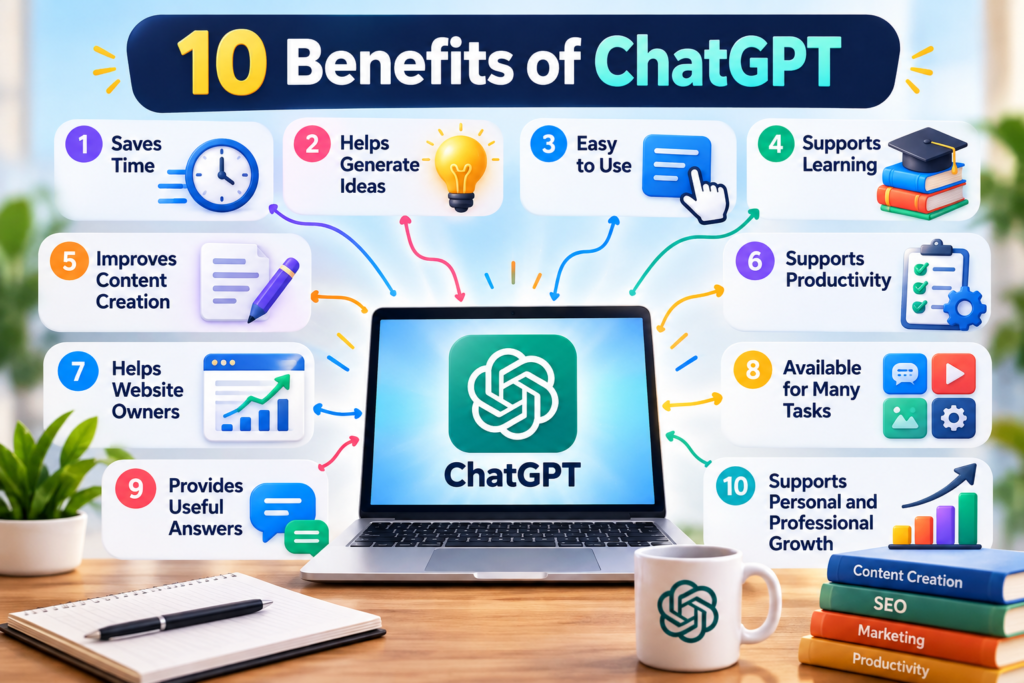
Saves Time
ChatGPT can help you quickly draft content, summarize information, brainstorm ideas, and complete repetitive tasks.
Helps Generate Ideas
When you are unsure what to write or create, ChatGPT can provide ideas for blog topics, content, marketing campaigns, social media posts, and more.
Easy to Use
You can interact with ChatGPT using natural language, making it accessible even if you have little technical experience.
Supports Learning
ChatGPT can explain complex topics in simpler language, provide examples, and help you explore new subjects at your own pace.
Improves Content Creation
Writers and website owners can use ChatGPT to create drafts, improve existing content, develop outlines, and generate different versions of text.
Supports Productivity
ChatGPT can help organize ideas, create checklists, draft emails, plan projects, and structure daily tasks.
Helps Website Owners
For website owners, ChatGPT can support SEO brainstorming, content planning, meta descriptions, FAQs, social media content, and marketing ideas.
Available for Many Tasks
From learning and writing to brainstorming and planning, ChatGPT can support a wide range of everyday activities. However, important information should always be reviewed and verified before relying on it.
10. Limitations of ChatGPT
Although ChatGPT can be useful for writing, learning, research, and productivity, it also has limitations. Understanding these limitations can help you use ChatGPT more effectively and avoid relying on it for information that needs verification.
It Can Make Mistakes
ChatGPT may sometimes provide incorrect or incomplete information. Always verify important facts with reliable sources.
Information May Need Verification
For current topics, statistics, prices, laws, or recent events, check up-to-date sources because information can change over time.
It Does Not Replace Experts
ChatGPT can provide general information, but it should not replace qualified professionals for important medical, legal, financial, or other specialized advice.
Responses Depend on Your Prompt
The quality of the response often depends on how clearly you explain what you need. Vague prompts may produce general or less useful answers.
It Can Lack Context
ChatGPT may not fully understand your personal situation, business, audience, or goals unless you provide enough relevant context.
SEO Data Requires Dedicated Tools
ChatGPT can help with keyword ideas, content planning, and SEO suggestions, but dedicated SEO tools are better suited for real search volume, keyword difficulty, rankings, backlinks, and competitor data.
Human Review Is Still Important
Before publishing or using ChatGPT-generated content, review it for accuracy, originality, tone, and usefulness. Human judgment remains an important part of creating high-quality content.
11. ChatGPT vs. Traditional Tools
ChatGPT can help with many tasks, but it does not necessarily replace specialized tools. In many cases, the best approach is to use ChatGPT alongside the tools designed specifically for each task.
| Task | ChatGPT | Specialized Tools |
|---|---|---|
| Keyword research | Brainstorm keyword ideas | Provide search volume, difficulty, and ranking data |
| SEO analysis | Suggest optimization ideas | Analyze websites, backlinks, rankings, and competitors |
| Content creation | Create drafts and outlines | Provide specialized writing and content optimization features |
| Website analytics | Help interpret data | Track real website traffic and user behavior |
| Graphic design | Generate ideas and prompts | Create and edit professional graphics |
| Email marketing | Write email drafts and subject lines | Manage subscribers, campaigns, and performance data |
| Project planning | Organize ideas and create plans | Manage tasks, deadlines, teams, and workflows |
The main difference is that ChatGPT is a flexible AI assistant, while specialized tools are designed to perform specific tasks and provide detailed data. Using both together can help you work more efficiently while making better-informed decisions.
12. How to Get Started With ChatGPT
If you are new to ChatGPT, you do not need to be an expert to get started. Follow a simple process to get useful results and gradually improve your prompts.
1. Choose a Goal
First, decide what you want ChatGPT to help you with. Your goal could be writing an article, learning a topic, generating ideas, planning a project, or improving your website.
2. Write a Prompt
Clearly explain what you need and provide enough context. Mention your topic, audience, preferred tone, and desired format when relevant.
3. Review the Response
Read the answer carefully and check whether it actually meets your goal. Look for missing details, unclear information, or anything that needs improvement.
4. Ask Follow-Up Questions
You can continue the conversation and ask ChatGPT to expand, simplify, rewrite, or explain specific parts of the response.
5. Verify Important Information
Always verify important facts, statistics, current information, and professional advice using reliable and up-to-date sources.
6. Improve the Result
Use follow-up prompts to refine the final result. Ask ChatGPT to make the content clearer, shorter, more detailed, more professional, or better suited to your audience.
Simple workflow:
Choose a goal → Write a prompt → Review the response → Ask follow-up questions → Verify important information → Improve the result
13. Best ChatGPT Prompts for Beginners
If you are just getting started with ChatGPT, clear and specific prompts can help you get more useful responses. The following copy-and-paste examples cover common tasks and can be customized by replacing the information in [brackets] with your own topic, audience, goal, or requirements. If the first response is not exactly what you need, you can continue the conversation and ask ChatGPT to improve, expand, simplify, or adjust the result.
Website Idea Prompt
“Give me 10 website ideas related to [NICHE]. For each idea, describe the target audience, main content topics, and possible ways to monetize the website.”
Blog Post Prompt
“Write a beginner-friendly blog post about [TOPIC]. Use a clear introduction, H2 headings, practical examples, FAQs, and a conclusion. Keep the language simple and easy to understand.”
SEO Prompt
“Create an SEO plan for an article targeting the keyword ‘[KEYWORD]’. Suggest related keywords, search intent, title ideas, headings, FAQs, and internal linking opportunities.”
Content Improvement Prompt
“Improve the following content to make it clearer, more engaging, and easier for beginners to understand. Keep the original meaning and make the information more useful: [PASTE CONTENT].”
Marketing Prompt
“Give me 10 practical marketing ideas to promote my [WEBSITE/PRODUCT/SERVICE]. Focus on content marketing, SEO, social media, email marketing, and affordable strategies.”
Learning Prompt
“Explain ‘What Is ChatGPT’ to me as a complete beginner. Use simple language, explain how it works, give practical examples, and include the main things I sh
14. ChatGPT Plans and Upgrade Options
ChatGPT offers different plans designed for different levels of use. The Free plan is suitable for basic everyday tasks, while paid plans provide expanded access to features, tools, and usage limits.
| Plan | Price* | Main Features | Best For |
|---|---|---|---|
| Free | $0/month | Basic ChatGPT access, web search, file uploads, image generation, and data analysis with usage limits | Beginners and occasional users |
| Go | From $8/month in the U.S.** | More messages, file uploads, image generation, data analysis, and longer memory | Regular users who want more access |
| Plus | $20/month | Higher limits, advanced reasoning, faster responses, image generation, file analysis, and Deep Research where available | Content creators, researchers, and professionals |
| Pro | $100 or $200/month*** | Higher access to advanced models and tools, with the highest tier providing maximum access | Heavy and advanced users |
* Prices and features can vary by country and may change over time.
** Go pricing is localized in some markets.
*** Pro has different tiers; availability and limits can change.
14. Which ChatGPT Plan Should You Choose?
For beginners, the Free plan is a good way to explore ChatGPT and learn how to use it. If you use ChatGPT regularly for content creation, research, SEO, coding, or other demanding tasks, a paid plan can provide higher limits and additional capabilities. Your choice should depend on how often you use ChatGPT and which features you need.
15. Frequently Asked Questions
Still have questions about ChatGPT? Here are clear answers to some of the most common questions beginners ask.
What is ChatGPT?
ChatGPT is an AI assistant developed by OpenAI that can understand and generate natural-language responses. It can help users with tasks such as writing, learning, brainstorming, coding, and planning.
Is ChatGPT free?
ChatGPT offers a free option, while paid plans can provide access to additional features, models, or higher usage limits. Available features and limits can change over time.
What can ChatGPT be used for?
ChatGPT can be used for many tasks, including answering questions, explaining topics, creating content, generating ideas, summarizing information, writing emails, and helping with coding.
Is ChatGPT good for beginners?
Yes. Beginners can use ChatGPT by asking questions in simple, everyday language. Clear prompts and follow-up questions can help users get more useful responses.
Can ChatGPT help with SEO?
Yes. ChatGPT can help brainstorm keywords, identify search-intent ideas, create content outlines, suggest titles, write meta descriptions, and generate FAQs. Dedicated SEO tools should still be used for detailed SEO data.
Can ChatGPT create website content?
Yes. ChatGPT can help create blog posts, website copy, FAQs, product descriptions, About pages, and other types of content. It is important to review and edit the content before publishing.
Can ChatGPT write code?
Yes. ChatGPT can generate code, explain programming concepts, help identify errors, and suggest solutions. Code should be tested and reviewed before being used in a live project.
Can ChatGPT create images?
Yes. ChatGPT can support image creation through available image-generation features. The exact image capabilities depend on the ChatGPT features available to your account.
Should I verify ChatGPT’s answers?
Yes. Important information should be checked against reliable and up-to-date sources, especially for facts, statistics, current events, legal matters, financial information, or other high-stakes topics.
Can ChatGPT replace dedicated SEO tools?
No. ChatGPT can support your SEO workflow, but specialized SEO tools provide data and features such as search volume, keyword difficulty, rankings, backlinks, and competitor analysis.
What are the main limitations of ChatGPT?
ChatGPT can sometimes provide incorrect, incomplete, or outdated information. It may also misunderstand vague instructions, so important information should be reviewed and verified before you rely on it.
Conclusion
Understanding What Is ChatGPT can help you see how this AI tool can support learning, writing, content creation, SEO, website planning, coding, and everyday tasks. While ChatGPT has limitations and should not replace specialized tools or human judgment, it can be a valuable assistant when used correctly.
If you are a beginner, start with one simple task, write a clear prompt, review the response, and improve it with follow-up questions. The more you practice, the better you can learn how to use ChatGPT effectively.