

Looking for a reliable and affordable web hosting service in 2026? Hostinger is a popular choice for beginners, bloggers, and small businesses. In this Hostinger Review 2026, we’ll look at its pricing, features, performance, security, pros and cons, and ease of use. By the end, you’ll have a clear idea of what Hostinger offers and whether it matches your website needs.
Table of Contents
1.What Is Hostinger?
Hostinger is a web hosting company that helps individuals, bloggers, businesses, and website owners publish their websites online. It provides hosting services, server resources, website-building tools, WordPress hosting, SSL certificates, and performance features needed to run a website. In this Hostinger Review 2026, we’ll look at its hosting plans, features, pricing, performance, and overall value for different types of websites.
1.What Does Web Hosting Do?
Web hosting stores your website’s files, such as images, text, and code, on a server. When someone enters your website address, the hosting server sends these files to their browser so they can view your website.
2.Why Choose Hostinger?
Hostinger offers several hosting options, including WordPress hosting, shared hosting, cloud hosting, and VPS hosting. It also provides tools such as SSL certificates, website-building features, backups, and security options.
In simple terms, your domain is your website’s address, while web hosting is the space where your website lives.
2.Hostinger Pricing in 2026
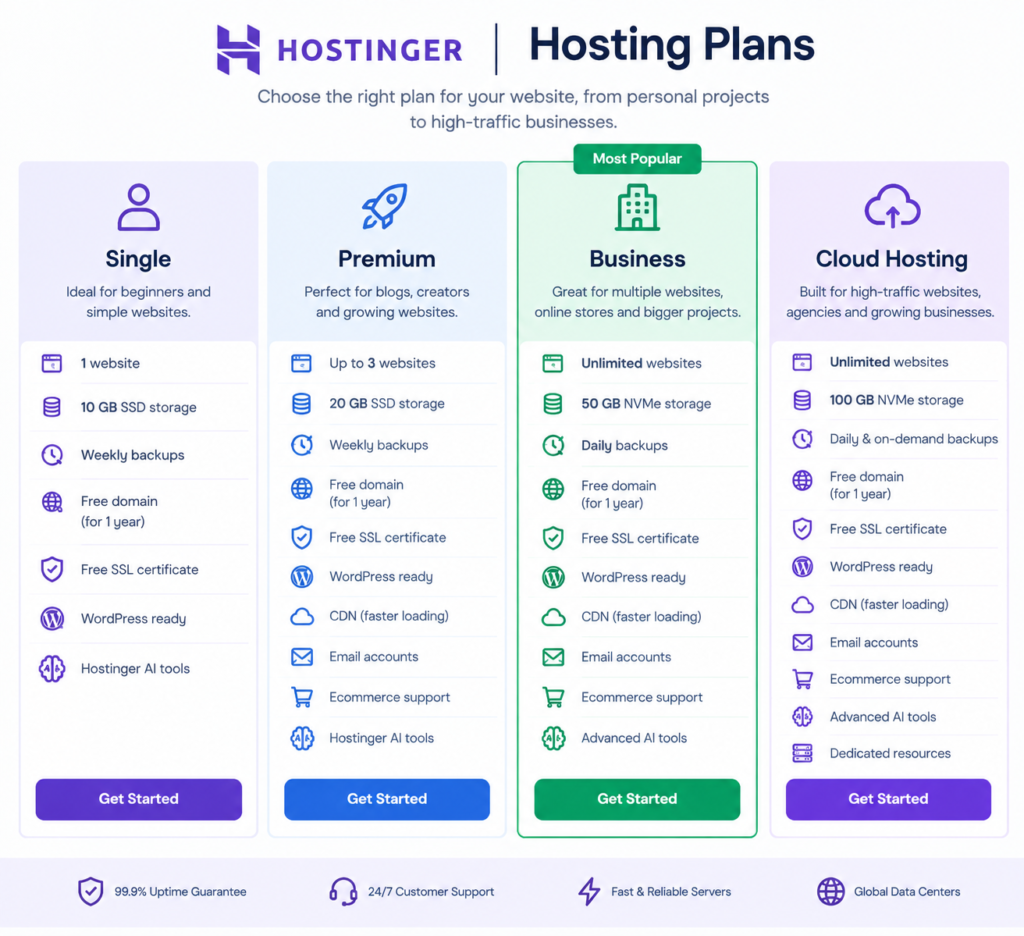
Hostinger offers several hosting plans designed for different types of websites, from simple personal projects to growing businesses and high-traffic websites. The main options include Single, Premium, Business, and Cloud Hosting. Each plan provides different levels of storage, website capacity, performance, backups, and resources, allowing users to choose a package based on their website’s needs and expected growth.
Comparatif des offres d’hébergement Hostinger
1. Single
The Single plan is designed for a simple website or personal project. It includes 1 website, 10 GB SSD storage, weekly backups, a free domain, SSL, and access to WordPress and Hostinger’s AI tools.
2. Premium
The Premium plan supports up to 3 websites and includes 20 GB SSD storage, a free domain for one year, weekly backups, CDN, email accounts, and ecommerce support.
3. Business
The Business plan is aimed at growing websites. It includes unlimited websites, 50 GB NVMe storage, daily backups, CDN, ecommerce features, and additional AI tools.
4. Cloud Startup
Cloud Startup provides more dedicated resources for higher-traffic websites, agencies, and online stores. It includes 100 GB NVMe storage, unlimited websites, daily and on-demand backups, CDN, and ecommerce support.
Important: Promotional vs. Renewal Price
The low price you see when signing up is usually an introductory price for the selected billing period. After that period, the hosting renews at the regular renewal rate. Hostinger states that you can check your exact renewal price in Billing → Subscriptions.
Tip: Don’t compare hosting providers only by their introductory price. Always check the renewal price, because it can be significantly higher.
3.Key Hostinger Features
Hostinger provides several features designed to make website hosting easier, especially for beginners. Here are the main features to look at in 2026:
1. Free SSL Certificate
Hostinger includes an SSL certificate with its hosting plans. SSL helps protect data between your website and its visitors and enables HTTPS.
2. WordPress Hosting
You can install and manage WordPress through Hostinger’s control panel. This makes it easier to create a blog, business website, or online store.
3. Website Builder
Hostinger offers a drag-and-drop website builder that lets beginners create a website without advanced coding skills.
4. Free Domain
Some plans include a free domain for the first year, depending on the plan and current offer.
5. Backups
Hostinger provides website backups, with the backup frequency depending on the hosting plan. Backups can help you restore your website if something goes wrong.
6. Website Speed
Hostinger uses technologies such as NVMe storage, caching, and CDN options to help websites load faster. Actual performance depends on the website, traffic, and configuration.
7. Security
Hostinger provides features such as SSL, malware protection, firewalls, and other security tools to help protect hosted websites.
8. AI Tools
Hostinger provides AI-powered tools that can help users generate website content, create websites, and perform other website-related tasks.
Quick Summary
Hostinger combines hosting, WordPress tools, website building, security, backups, performance features, and AI tools in one platform. This makes it possible for beginners to manage many parts of a website from one place.
4.Hostinger Performance
Website performance is an important factor in user experience and SEO because visitors expect pages to load quickly. In this Hostinger Review 2026, Hostinger uses modern hosting technologies, caching tools, CDN options, and optimized server infrastructure to help improve website speed, reliability, loading times, and overall performance. Faster websites can provide a better user experience and help reduce bounce rates, making performance an important consideration when choosing a web hosting provider.
1. Website Speed
Hostinger uses NVMe storage, caching, and CDN technology on supported plans. These features can help your website load faster, especially when serving images, pages, and other website files.
2. Uptime and Reliability
Hostinger operates its hosting infrastructure with the goal of keeping websites available and accessible. However, uptime can vary depending on the hosting plan, server location, website configuration, and traffic.
3. Performance for Beginners
For a small blog, portfolio, or business website, Hostinger can provide enough performance for getting started. Websites with high traffic or more demanding applications may need a plan with additional resources, such as cloud or VPS hosting.
5.What Affects Your Website Speed?
Your hosting provider is only one part of website performance. Speed can also depend on:
- Image and video sizes
- WordPress plugins
- Website theme
- Caching settings
- Number of visitors
- Server location
- Website code
In short: Hostinger provides several tools to support fast website performance, but your website’s actual speed depends on both the hosting plan and how the website is built and optimized.
6.How to Set Up Hostinger
Setting up Hostinger is simple, even if you are new to web hosting. Follow these steps to get your website online.
1. Choose a Hostinger Plan
Visit Hostinger and choose a hosting plan that fits your website. Consider the number of websites, storage, traffic, and features you need.
2. Create Your Account
Create a Hostinger account using your email address or an available sign-in option. Complete the payment process to activate your hosting plan.
3. Choose or Connect a Domain
You can register a new domain or connect a domain you already own. Follow Hostinger’s instructions to point the domain to your hosting account.
4. Install WordPress
If you want to use WordPress, open your Hostinger control panel and use the WordPress installation option. Follow the setup instructions and create your administrator account.
5. Choose a Theme
After installing WordPress, choose a theme that matches your website. You can customize the colors, fonts, layout, and content.
6. Add Your Website Content
Create your main pages, such as Home, About, Services, Blog, and Contact. Add your text, images, and other content.
7. Secure and Test Your Website
Make sure HTTPS/SSL is active, check that your pages work correctly, and test your website on both mobile and desktop devices.
Quick Checklist
Choose a plan → Create an account → Connect a domain → Install WordPress → Choose a theme → Add content → Test your website.
Once these steps are complete, your Hostinger website is ready to launch.
7.Hostinger Pros and Cons
Before choosing a hosting provider, it is useful to look at both its advantages and limitations.
Pros of Hostinger
– Beginner-friendly: The control panel is designed to make website management easier.
– Affordable introductory plans: Hostinger often offers competitive prices for new customers.
– WordPress support: WordPress can be installed and managed easily.
– Free SSL: SSL certificates are included with hosting plans.
– Website builder: Beginners can create websites without advanced coding skills.
– AI tools: Several AI-powered tools are available to help with website creation and content.
– Performance features: Supported plans include technologies such as NVMe storage, caching, and CDN options.
– Multiple hosting options: You can upgrade from basic hosting to cloud or VPS hosting as your website grows.
Cons of Hostinger
– Renewal prices are higher: The introductory price can increase significantly when the plan renews.
– Features vary by plan: Some advanced features are available only on higher-tier plans.
– Long-term pricing matters: The lowest advertised price generally requires a longer initial subscription period.
– Resources are limited on basic plans: High-traffic websites may need a more powerful hosting solution.
– Extra services can increase costs: Some optional features and services may require additional payment.
Quick Takeaway
Hostinger can be a practical option for beginners and small websites, but you should compare the renewal price, included resources, and plan limitations before purchasing.
8.Hostinger vs Other Hosting Providers
Hostinger is one of several popular web hosting providers. The right choice depends on your budget, website size, performance needs, and the features you require.
| Criteria | Hostinger | Bluehost | SiteGround | DreamHost |
|---|---|---|---|---|
| Ease of use | Beginner-friendly | Beginner-friendly | Beginner-friendly | Beginner-friendly |
| WordPress | Yes | Yes | Yes | Yes |
| Website builder | Yes | Yes | Yes | Yes |
| Free SSL | Yes | Yes | Yes | Yes |
| Performance tools | Caching and CDN on supported plans | Caching and CDN options | Caching and CDN | Caching and CDN options |
| Hosting options | Shared, Cloud, VPS | Shared, VPS, Dedicated | Web hosting, Cloud | Shared, VPS, Dedicated |
| Best suited for | Beginners and growing websites | WordPress beginners | Performance-focused websites | WordPress and general websites |
Short introduction for the table:
Hostinger, Bluehost, SiteGround, and DreamHost all provide beginner-friendly hosting with WordPress support, website builders, and free SSL. Their hosting options and performance tools differ, so the right choice depends on your website type, technical needs, and budget.
What Should You Compare?
When comparing Hostinger with other hosting providers, look at these factors:
1. Price: Check both the introductory and renewal prices.
2. Performance: Consider storage technology, caching, CDN, and available resources.
3. Features: Check SSL, backups, email, domains, and website tools.
4. WordPress support: Make sure the provider offers the tools you need.
5. Customer support: Check the available support channels and hours.
6. Scalability: Choose a provider that lets you upgrade as your website grows.
Simple Comparison Summary
Hostinger focuses on easy website management, competitive introductory pricing, and a wide range of built-in tools. Other providers may offer different combinations of performance, WordPress features, support, and hosting options.
Instead of choosing a provider based only on price, compare the total cost, renewal price, resources, and features that your specific website needs.
9.Who Should Use Hostinger?
Hostinger can be suitable for people who want an easy way to create and manage a website without dealing with complex server settings.
Hostinger is a good fit for:
– Beginners who are creating their first website.
– Bloggers who want to build a WordPress blog.
– Small businesses that need a simple business website.
– Freelancers who want to create websites for themselves or clients.
– Online stores that need ecommerce hosting.
– Website owners on a budget who want to compare affordable hosting plans.
– Growing websites that may need to upgrade to a more powerful hosting plan later.
Who May Need Another Option?
Very large websites, applications with specialized server requirements, or businesses needing highly customized infrastructure may need cloud, VPS, dedicated, or specialized hosting instead of basic shared hosting.
In short: Hostinger is mainly worth considering if you want simple website management, WordPress support, and flexible hosting options, while still having the ability to upgrade as your website grows.
10.Frequently Asked Questions
Frequently Asked Questions About Hostinger
Is Hostinger good for beginners?
Yes. Hostinger provides a user-friendly control panel, WordPress tools, and a website builder that can make it easier for beginners to create and manage a website.
Is Hostinger reliable?
Hostinger provides hosting infrastructure designed for website availability and performance. However, actual reliability can depend on your hosting plan, server location, website configuration, and traffic.
Does Hostinger include SSL?
Yes. SSL certificates are included with Hostinger hosting plans. SSL enables HTTPS and helps protect information exchanged between your website and its visitors.
Is WordPress easy to install on Hostinger?
Yes. Hostinger provides a guided WordPress installation process, so you can set up WordPress without manually configuring a server.
Does Hostinger offer a free domain?
Some hosting plans include a free domain for the first year. The exact eligibility depends on the plan and current offer.
Is Hostinger good for a small business website?
It can be suitable for many small business websites, particularly when the website has moderate traffic and does not require specialized server resources.
Can I move my existing website to Hostinger?
Yes. Hostinger provides website migration options, although the exact process depends on your website platform and hosting setup.
What happens when my Hostinger plan expires?
If you do not renew your hosting service, your website may eventually become unavailable. Check your Hostinger account for the specific renewal date, price, and applicable terms.
Does Hostinger offer customer support?
Yes. Hostinger provides customer support through its available support channels. The exact options can vary by product and region.
Is Hostinger worth considering in 2026?
It depends on your website’s needs. Compare the renewal price, resources, features, performance requirements, and support before choosing a hosting provider.
11.Final Verdict
If you are looking for reliable web hosting, this Hostinger Review 2026 highlights the main features, pricing factors, performance tools, and hosting options to consider. Hostinger offers beginner-friendly hosting with WordPress support, free SSL, backups, website-building tools, and performance features.
Its introductory prices can be attractive, but it is important to check the renewal price, included resources, storage, and other plan limitations before purchasing. This can help you choose a hosting plan that matches your website’s needs and budget.
For beginners, bloggers, small businesses, and growing websites, Hostinger provides several hosting options. However, websites with advanced technical requirements or higher resource demands may need a more specialized hosting solution.
Before making a decision, compare the Hostinger hosting plans with other providers based on price, renewal costs, features, performance, resources, and scalability. This Hostinger Review 2026 can help you understand what to consider before choosing a plan.
Final CTA
Ready to Start Your Website?If you’re looking for beginner-friendly web hosting, Hostinger is worth considering in 2026. Compare the available Hostinger hosting plans, features, resources, performance, and renewal prices to find the option that best fits your website and budget.
Ready to get started with Hostinger? Explore the latest hosting plans, choose the right package for your needs, and start building your website today.