Table of Contents
Introduction: Why WordPress Plugins Matter
Best WordPress Plugins for Beginners can make it much easier to build, manage, and improve a WordPress website without needing advanced coding skills. Plugins extend the functionality of WordPress by adding useful features for SEO, website design, security, performance, backups, forms, and more.
However, with thousands of plugins available, choosing the right ones can be difficult, especially for beginners. Installing too many unnecessary plugins can also make website management more complicated.
In this guide, we’ll explore 10 essential WordPress plugins for beginners and explain what each plugin does, who it is best for, and how it can help improve your website. Whether you are creating a blog, business website, portfolio, or online store, these plugins can provide a strong foundation for your WordPress site.
1.What is a WordPress plugin?
A WordPress plugin is an add-on that extends the functionality of a WordPress website without requiring you to write code. Plugins can add new features, improve website performance, enhance security, optimize SEO, create contact forms, build online stores, and much more.
For example, an SEO plugin can help optimize your pages for search engines, while a page builder plugin can make it easier to design professional websites. With thousands of free and premium plugins available, WordPress users can customize their websites based on their specific needs.
2.Why do you need plugins?
The Best WordPress Plugins for Beginners can help you add important features to your website without learning complicated coding. Plugins make it easier to improve SEO, security, website speed, contact forms, backups, and other essential functions.
For beginners, the right plugins can save time and make WordPress easier to manage. Instead of building every feature from scratch, you can install trusted plugins that provide ready-to-use tools and help create a more professional, secure, and functional website.
3.Best WordPress Plugins for Beginners: SEO Plugins
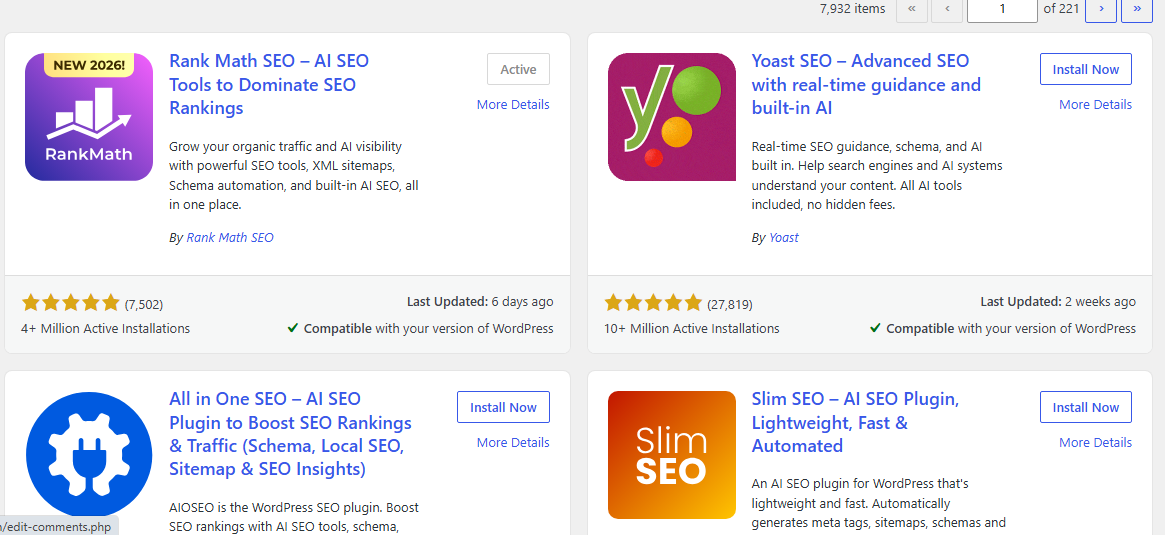
SEO plugins make it easier for beginners to optimize their WordPress websites and improve their visibility in search engines. The Best WordPress Plugins for Beginners should provide simple tools for optimizing content, managing technical SEO, and improving important website settings.
1. Rank Math
Rank Math is a popular SEO plugin that provides many features in one place. It can help you optimize posts and pages for target keywords, edit SEO titles and meta descriptions, create XML sitemaps, add schema markup, and identify basic SEO issues. Its setup process and recommendations also make SEO easier for beginners.
2. Yoast SEO
Yoast SEO is another widely used option for WordPress websites. It provides content analysis and recommendations that help users improve readability and on-page SEO. Beginners can use it to optimize SEO titles, meta descriptions, focus keyphrases, XML sitemaps, and other essential SEO settings.
3. All in One SEO (AIOSEO)

All in One SEO offers a range of tools for improving WordPress SEO. It helps users optimize individual pages, manage titles and descriptions, create XML sitemaps, and configure important technical SEO settings. Its guided setup makes it a useful choice for beginners who want a straightforward SEO solution.
When choosing from the Best WordPress Plugins for Beginners, consider your website’s needs, the features you require, and how easy the plugin is to use. A plugin with a clear interface and helpful recommendations can make the SEO process much easier.
4.Best plugins for security
Website security is important for protecting your WordPress site from malware, hacking attempts, spam, and unauthorized access. The Best WordPress Plugins for Beginners should include reliable security tools that are easy to configure and understand, even if you have limited technical knowledge.
1. Wordfence Security
Wordfence is one of the popular security plugins for WordPress. It includes a firewall, malware scanner, login security features, and protection against suspicious activity. Beginners can use its security tools to monitor their website and identify potential threats.
2. Solid Security
Solid Security provides several features designed to protect WordPress websites. It can help secure user logins, prevent common attacks, strengthen passwords, and monitor suspicious activity. Its security settings can be useful for beginners who want additional protection without dealing with complicated configurations.
3. Sucuri Security
Sucuri Security offers tools for monitoring and improving WordPress website security. It can help detect security problems, monitor file changes, and identify potential threats. It is a useful option for website owners who want to keep an eye on their site’s security status.
Choosing a security plugin depends on your website type and security requirements. For beginners, it is best to choose a trusted plugin with clear settings and features that provide protection without making website management unnecessarily complicated.
5.Best plugins for speed
Website speed has a direct impact on user experience and can also influence how well your pages perform in search results. A slow website may frustrate visitors and increase the chance that they leave before the page finishes loading. The Best WordPress Plugins for Beginners can help improve performance by using caching, image optimization, code optimization, and other speed-enhancing features.
1. WP Rocket
WP Rocket is a popular caching and performance plugin for WordPress. It can improve loading times through page caching, browser caching, file optimization, and other performance features. Its simple interface makes it a good choice for beginners who want to optimize their website without complicated technical settings.
2. LiteSpeed Cache
LiteSpeed Cache provides caching and performance optimization features for WordPress websites hosted on LiteSpeed servers. It can help optimize CSS and JavaScript, compress images, create cached pages, and improve overall website performance. Many of its features are available for free.
3. WP-Optimize
WP-Optimize combines several performance tools in one plugin. It can help clean and optimize the WordPress database, compress images, and use caching to improve page loading times. This makes it a practical option for website owners looking for several optimization features in one place.
When choosing a speed plugin, consider your hosting provider, website configuration, and the performance features you actually need. Using the right tools and avoiding unnecessary plugins can help keep your WordPress website fast and responsive.
6.Best plugins for contact forms
Contact forms make it easier for visitors to get in touch with you without displaying your email address publicly. They are useful for business websites, blogs, portfolios, service websites, and online stores. The Best WordPress Plugins for Beginners should make creating and managing forms simple, even if you have no coding experience.
1. WPForms
WPForms is a beginner-friendly form builder with a drag-and-drop interface. You can create contact forms, registration forms, feedback forms, and other types of forms without writing code. It also offers templates that can help you create a form quickly.
2. Contact Form 7
Contact Form 7 is a popular WordPress plugin for creating simple contact forms. It supports multiple forms and basic customization options. It can be a good choice for users who want a lightweight and free solution.
3. Forminator
Forminator lets you create contact forms, quizzes, polls, surveys, and other interactive forms. Its visual builder makes it easier to customize fields and create forms that match your website’s needs.
When choosing a contact form plugin, consider how easy it is to create forms, what features you need, and whether the plugin supports spam protection and email notifications. A simple, reliable form can help you communicate with visitors and turn website inquiries into potential customers.
7.Best plugins for backups
Best Plugins for Backups
Regular backups are essential for protecting your WordPress website from unexpected problems such as server errors, hacking, failed updates, or accidental changes. The Best WordPress Plugins for Beginners should make it easy to create, schedule, and restore website backups without requiring technical knowledge.
1. UpdraftPlus
UpdraftPlus is a popular backup plugin that allows you to create complete backups of your WordPress files and database. You can schedule automatic backups and store them in remote locations such as cloud storage. Its straightforward interface makes it a practical choice for beginners.
2. Duplicator
Duplicator provides backup and migration tools for WordPress websites. It can create copies of your website that can be used for backups, migrations, or moving a site to a new hosting provider. It is useful for beginners who want an additional way to protect their website data.
3. BackWPup
BackWPup helps you create scheduled backups of your WordPress files and database. It supports different storage options and can automate the backup process, reducing the need to manually save your website data.
When choosing a backup plugin, look for features such as automatic scheduling, reliable storage options, easy restoration, and database backups. Keeping regular backups gives you a safer way to recover your website if something goes wrong.
8.How to install a WordPress plugin:A Beginner’s Guide
Installing a WordPress plugin is a simple process, even if you are new to WordPress. The Best WordPress Plugins for Beginners can add useful features to your website without requiring coding knowledge. Follow these steps to install a plugin safely:
1. Log in to your WordPress Dashboard
Open your WordPress admin area and log in with your administrator account.
2. Go to Plugins → Add New Plugin
From the dashboard, click Plugins and then select Add New Plugin. You will see a list of available plugins.
3. Search for a plugin
Use the search bar to find the plugin you need. You can search for SEO, security, backup, speed optimization, or contact form plugins.
4. Click “Install Now”
When you find the right plugin, check its details and click Install Now. WordPress will automatically download and install it.
5. Activate the plugin
After installation, click Activate to enable the plugin. Some plugins may open a setup wizard to guide you through the initial configuration.
6. Configure the plugin
Open the plugin settings and customize the available options according to your website’s needs. Start with the essential features and avoid changing advanced settings unless you understand their purpose.
Choosing from the Best WordPress Plugins for Beginners can make this process easier because beginner-friendly plugins usually provide simple interfaces, clear instructions, and helpful setup options.
Tip: Before installing any plugin, check that it is regularly updated, compatible with your WordPress version, and has positive user reviews. Using trusted plugins can help keep your website secure, fast, and reliable.
9.How to choose the right plugin
Choosing the right plugin is important for keeping your WordPress website secure, fast, and easy to manage. With thousands of plugins available, beginners should focus on quality and compatibility rather than installing too many tools. The Best WordPress Plugins for Beginners should provide useful features without making your website unnecessarily complicated.
1. Check Ratings and Reviews
Before installing a plugin, look at its user ratings and reviews. Feedback from other WordPress users can help you understand whether the plugin is reliable and easy to use.
2. Check Updates and Compatibility
Choose plugins that are regularly updated by their developers. Also, check whether the plugin is compatible with your current version of WordPress.
3. Look at Active Installations
A plugin with many active installations can be a useful indication that it is widely used. However, popularity should not be the only factor when making your decision.
4. Consider Features You Actually Need
Avoid installing a plugin simply because it has many features. Choose one that solves a specific problem or adds functionality that your website really needs.
5. Check Performance and Security
Some plugins can affect website performance or introduce security risks if they are poorly maintained. Choose reputable plugins and avoid unnecessary or outdated ones.
6. Consider Ease of Use
For beginners, a simple interface and clear settings can make a big difference. The Best WordPress Plugins for Beginners should be easy to configure and provide helpful documentation or support.
By carefully checking these factors before installing a plugin, you can build a more reliable WordPress website while avoiding unnecessary plugins and potential compatibility problems.
Final Recommendations
Choosing the right plugins is essential for building a secure, fast, and effective WordPress website. Instead of installing a large number of plugins, focus on reliable tools that provide the features your website actually needs and are regularly maintained by their developers.
For beginners, start with essential solutions for SEO, security, performance, contact forms, and backups. Before installing a plugin, check its ratings, update history, compatibility, and available support.
If you want to discover more useful tools and solutions for your website, explore our recommended WordPress plugins.
With the right selection of plugins, you can improve your website’s functionality, performance, and user experience while keeping WordPress simple and easy to manage.